We independently review everything we recommend. When you buy through our links, we may earn a commission. As an Amazon Associate we earn from qualifying purchases.
5 Best Gaming Laptops Dave Lee Picks (November 2026)
Compare five gaming laptops in the style Dave Lee covers, with RTX 4060 graphics, fast displays and strong cooling, and pick the right one for your games.
Compare five gaming laptops in the style Dave Lee covers, with RTX 4060 graphics, fast displays and strong cooling, and pick the right one for your games.
Dave Lee built his audience by opening up laptops, measuring what matters, and explaining trade-offs in plain language, and that approach fits gaming laptops better than almost any other category. The real decision here is not which machine has the biggest graphics card on paper, because two laptops with the same RTX 4060 can play very differently once cooling, display, memory, and the exact configuration are taken into account. A buyer who skips those details can end up with a machine that looks strong in a headline and stutters in the games they play.
This guide is for players who want an RTX 4060 laptop without wading through many near-identical model numbers, for students and creators who need one machine for both games and coursework, and for anyone upgrading from an older laptop. Every laptop below was chosen from the name and specifications shown on its Amazon product page, with the exact model code and ASIN so the configuration can be checked before ordering.
Quick Picks
As an Amazon Associate we earn from qualifying purchases
RTX 4060, Intel Core i7-13700HX, 16GB DDR5, 1TB Gen 4 SSD, 16-inch 2560 x 1600 165Hz G-SYNC
How to Choose
Match the graphics power to the display
A graphics card does not work in isolation, because the screen decides how hard it has to work. An RTX 4060 with 8GB of video memory handles a 1920 x 1080 or 1920 x 1200 panel comfortably, while the same card at 2560 x 1600 renders far more pixels per frame. That is why the Strix G16 and TUF A15 use a Full HD class panel, while the Legion 5i and Helios 16 use a QHD class panel and need lower settings in demanding titles. Before choosing, decide which resolution you will play at, then check the listed graphics power figure, since a 140W version holds higher clocks longer than a lower-power version.
Check the processor and memory together
Modern games lean on the processor for physics, crowd scenes, and background tasks, so a weak CPU can hold back a strong graphics card. All five laptops here use either a 13th Gen Intel Core i7 HX chip or an AMD Ryzen 7 8000 or 7000 series chip, which gives enough headroom for gaming alongside a browser, chat, and recording software. Memory matters just as much, because 16GB is the practical minimum for current games, while 32GB leaves room for large modded games, video editing, and heavy multitasking without closing applications. If a laptop ships with 16GB, confirm whether it has two memory slots and a stated maximum, so a later upgrade stays possible.
Look closely at storage size and speed
A 1TB SSD sounds generous until a modern game library starts growing, because several popular titles now take well over 100GB each once updates and extra content are counted. Every laptop in this guide ships with a 1TB PCIe SSD, which keeps loading times short and leaves room for a working set of games without constant uninstalling. Speed matters too, since a PCIe Gen4 drive moves game data faster than an older drive, and that shows up in level loads and fast travel rather than in frame rates. Check how many M.2 slots the listing mentions, because a second slot turns a future storage upgrade into a simple addition instead of a replacement.
Weigh cooling, weight, and everyday use
Gaming laptops generate serious heat, and the cooling system decides whether performance stays steady through a long session or fades after twenty minutes. Look for the cooling features named on the product page, such as dual fans, heat pipes, or a named system like Cooler Boost 5, and remember that a thinner chassis usually means louder fans under load. Weight and battery life shape daily life as well, because a 16-inch gaming laptop is a desk machine that can travel, not a featherweight ultrabook. If the laptop will move between home, lectures, and a friend’s place, the screen size, chassis weight, and port layout deserve as much attention as the graphics card.
The 5 Best Options
ASUS ROG Strix G16 G614JV-AS74
Top Pick
ASUS ROG Strix G16 G614JV-AS74
Best for: Players who want a 16-inch, high-refresh RTX 4060 laptop for fast-paced games at Full HD class resolution.
Display: 16 inches, 165Hz, 1920 x 1200
Processor: 13th Gen Intel Core i7-13650HX
Graphics: NVIDIA GeForce RTX 4060 Laptop GPU at 140W Max TGP
Players who want a 16-inch, high-refresh RTX 4060 laptop for fast-paced games at Full HD class resolution.
Watch out for
Confirm the exact G614JV-AS74 configuration on the listing before ordering, since Strix G16 variants differ in processor, graphics, memory, and storage.
The Strix G16 suits a buyer who wants a straightforward, high-refresh gaming laptop with a large screen and no fussy compromises. Its Intel Core i7-13650HX and RTX 4060 pairing runs at a listed 140W maximum graphics power, which keeps frame rates steady in demanding games at the panel’s 1920 x 1200 resolution. Sixteen gigabytes of DDR5 memory and a 1TB PCIe Gen4 SSD cover current games and everyday multitasking, while Wi-Fi 6E keeps wireless play responsive. Windows 11 comes installed, so the machine is ready to set up and play from the first evening.
Watch out for: Confirm the exact G614JV-AS74 configuration on the listing before ordering, since Strix G16 variants differ in processor, graphics, memory, and storage.
Lenovo Legion 5i
Runner-Up
Lenovo Legion 5i
Best for: Players who run mod-heavy games, stream, or keep many applications open beside the game.
The Legion 5i stands out on memory and screen, pairing 32GB of DDR5 with a 16-inch QHD display that runs at 165Hz with G-SYNC. Its Intel Core i7-13650HX and RTX 4060 combination carries a listed 140W graphics power figure, and the extra memory means large modded games, streaming software, and a browser full of tabs can run side by side without constant juggling. A 1TB PCIe NVMe SSD keeps loading times short, and the QHD panel makes both games and creative work look sharper than a Full HD screen. This is the pick for a buyer who wants the roomiest configuration in this group.
Watch out for: Check the seller and warranty lines for this exact configuration, since seller-configured listings can differ from factory builds.
ASUS TUF Gaming A15 FA507NV-EH74
ASUS TUF Gaming A15 FA507NV-EH74
Best for: Players who want a tough, portable 15.6-inch gaming laptop with a clearly stated graphics power limit.
Display: 15.6 inches, Full HD 1920 x 1080, 144Hz, full sRGB coverage, G-Sync
Processor: AMD Ryzen 7 7735HS
Graphics: NVIDIA GeForce RTX 4060 Laptop GPU at 140W Max TGP
Players who want a tough, portable 15.6-inch gaming laptop with a clearly stated graphics power limit.
Watch out for
Check the exact FA507NV-EH74 configuration and warranty term shown for this listing, since TUF A15 variants differ in processor, graphics, memory, and storage.
The TUF Gaming A15 is the durable, no-nonsense option in this group, built around an AMD Ryzen 7 7735HS and an RTX 4060 listed at 140W maximum graphics power. Its 15.6-inch Full HD display runs at 144Hz with full sRGB coverage and G-Sync, which suits fast, colourful games and everyday use alike. Sixteen gigabytes of DDR5 memory and a 1TB PCIe SSD handle a solid game library, while Wi-Fi 6 and a MUX Switch round out a practical specification. The smaller screen and TUF styling make it the easiest of the five to carry, and the stated upgrade room keeps it useful for years.
Watch out for: Check the exact FA507NV-EH74 configuration and warranty term shown for this listing, since TUF A15 variants differ in processor, graphics, memory, and storage.
MSI Katana A15 AI B8VF-448US
MSI Katana A15 AI B8VF-448US
Best for: Players who want 32GB of memory fitted as standard in a 15.6-inch Ryzen gaming laptop.
Display: 15.6 inches, Full HD 1920 x 1080, 144Hz
Processor: AMD Ryzen 7 8845HS, 8 cores, up to 5.1 GHz
Players who want 32GB of memory fitted as standard in a 15.6-inch Ryzen gaming laptop.
Watch out for
Confirm the graphics power figure and the exact B8VF-448US configuration on the listing, since Katana variants differ in memory, storage, and graphics power.
The Katana A15 AI gives a buyer 32GB of memory without stepping up to a flagship chassis, and that is its clearest advantage over the 16GB machines here. An AMD Ryzen 7 8845HS with eight cores sits beside an RTX 4060 with 8GB of video memory, while the 15.6-inch Full HD display runs at 144Hz for smooth play. The 1TB SSD leaves room for a working library, Wi-Fi 6E keeps wireless connections current, and Cooler Boost 5 handles heat during long sessions. A backlit RGB keyboard and Windows 11 Home complete a package aimed squarely at players who want memory headroom from day one.
Watch out for: Confirm the graphics power figure and the exact B8VF-448US configuration on the listing, since Katana variants differ in memory, storage, and graphics power.
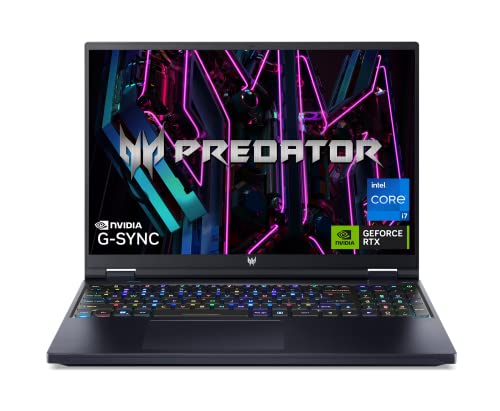
Acer Predator Helios 16 PH16-71-74UU
Acer Predator Helios 16 PH16-71-74UU
Best for: Buyers who want a sharp 1600p display and two Thunderbolt 4 ports for a docked desk setup.
The Predator Helios 16 is the sharpest screen in this group, with a 16-inch 2560 x 1600 display running at 165Hz with G-SYNC. Its 13th Gen Intel Core i7-13700HX and RTX 4060 pairing covers most games at that resolution, while 16GB of DDR5 memory and a 1TB Gen 4 SSD keep the rest of the specification in step. Killer Wi-Fi 6E handles wireless play, and the two Thunderbolt 4 ports make it easy to connect a dock, a fast external drive, and a second display. This is the machine for a buyer whose desk setup matters as much as the game itself.
Watch out for: With 16GB of memory fitted, check whether your games and multitasking habits call for a higher-capacity configuration instead.
Which One Fits Your Situation
You want the simplest strong all-rounder
Take the ASUS ROG Strix G16 G614JV-AS74, because its 16-inch 165Hz screen, full-power RTX 4060, and 1TB SSD cover the most common gaming needs without a weak link. The Intel processor handles background tasks well, and the Full HD class resolution keeps frame rates high in demanding games. It is the easiest recommendation in this guide for a buyer who wants to choose once and play.
You play modded games or multitask heavily
Take the Lenovo Legion 5i, because 32GB of memory fitted as standard removes the most common bottleneck for modded games, streaming, and creative work running beside a game. Its QHD 165Hz display with G-SYNC also looks sharper than the Full HD panels here, which helps when the laptop doubles as a work machine. The same full-power RTX 4060 keeps gaming performance in step with the rest of the group.
You carry the laptop everywhere
Take the ASUS TUF Gaming A15 FA507NV-EH74, because its 15.6-inch frame is the most portable of the five while still offering a clearly stated 140W RTX 4060. The Ryzen processor and 1TB SSD handle games and coursework alike, and the 144Hz display with full sRGB coverage suits both play and everyday use. Check the upgrade slots before buying, so a future memory or storage change stays simple.
You want the sharpest screen and the best desk ports
Take the Acer Predator Helios 16 PH16-71-74UU, because its 2560 x 1600 display at 165Hz with G-SYNC is the sharpest panel here, and two Thunderbolt 4 ports make a docked setup straightforward. The Core i7-13700HX and RTX 4060 pairing handles a wide range of games, while Killer Wi-Fi 6E keeps wireless play steady. If 32GB of memory matters more than screen sharpness, the Legion 5i or the Katana A15 AI fits better instead.
Common Mistakes
Buying by graphics card name alone, without checking the listed graphics power figure, display resolution, and exact model code.
Choosing a QHD or 1600p display and then expecting the same frame rates as a Full HD panel in demanding games.
Settling for a small SSD and then uninstalling games constantly, instead of starting with 1TB and checking for a second M.2 slot.
Ignoring memory configuration, such as whether 16GB is fitted as one module or two, and whether the laptop can be upgraded later.
Overlooking ports, cooling, and weight, then finding the laptop awkward on a desk or loud during long sessions.
Frequently Asked Questions
What does Dave Lee usually focus on when he covers a gaming laptop?
He focuses on the details that change daily use, such as cooling behaviour, display quality, keyboard feel, and port selection, and whether the listed specification matches the exact configuration being sold. That is why this guide names the model code and ASIN for every laptop, so the configuration can be checked on the Amazon listing before ordering.
Is an RTX 4060 laptop enough for current games?
An RTX 4060 laptop with 8GB of video memory handles most current games well at Full HD resolution, and it manages QHD play with adjusted settings. The five laptops here all pair the card with a processor and at least 16GB of memory, which matters as much as the graphics card. Check the display resolution and graphics power figure before deciding.
How much memory and storage should a gaming laptop have?
Sixteen gigabytes of memory is the minimum for current games, while 32GB suits modded games, streaming, and heavy multitasking. A 1TB SSD is the sensible starting point for a game library, since titles take up a lot of space once updates are counted. If a laptop ships with 16GB, confirm the slot layout and stated maximum so a later upgrade remains possible.
Should I pick a 15.6-inch or a 16-inch gaming laptop?
A 15.6-inch laptop is easier to carry and fits smaller bags, while a 16-inch laptop offers a larger screen and more room for cooling. The TUF A15 and Katana A15 AI suit buyers who travel with the machine, while the Strix G16, Legion 5i, and Helios 16 suit desk players. Screen resolution matters too, so compare the panel beside the size.
K
Kissmyaster Editorial Team
We compare specs, materials and verified owner reviews before a product earns a spot. Rankings are never paid.
Affiliate disclosure. As an Amazon Associate we earn from qualifying purchases at no extra cost to you. Prices accurate as of the date shown.
Find the best solar spotlights for palm trees, from wraparound ring lights to adjustable stake uplights, with brightness, battery and weatherproofing compared.
Find the best on bed gaming rocking chairs for long console sessions: four low-profile floor rockers compared by audio, weight capacity, folding and on-bed fit.
Four scopes with reticles and dials matched to .350 Legend ballistics: a pre-calibrated Leupold, a 50mm Vortex for dim woods, a Burris and a Sightmark BDC.
Four expandable solar generator kits with solar panels and room to add batteries later, compared on capacity, AC output, solar input and expansion limits.
Five camping saws for firewood, trail clearing and camp chores, compared on blade length, tooth pattern, carry weight and how safely each one packs away.
Compare the best house batteries for boat use by chemistry, capacity, BMS and group size, with LiFePO4 and AGM deep-cycle options for lights, fridge, pumps and electronics.
What is the best current to charge NiMH batteries? Learn how C-rate works, the standard and fast charge currents for AA and AAA cells, safe trickle rates, and how smart chargers know when to stop.


 MSI Katana A15 AI B8VF-448US
 Acer Predator Helios 16 PH16-71-74UU