We independently review everything we recommend. When you buy through our links, we may earn a commission. As an Amazon Associate we earn from qualifying purchases.
4 Best Photo Printers for Home Albums (November 2026)
Four desktop photo printers compared on ink system, borderless sizes, paper handling and running costs, with fit notes for albums, cards and framed prints.
Four desktop photo printers compared on ink system, borderless sizes, paper handling and running costs, with fit notes for albums, cards and framed prints.
A photo printer earns its desk space only if the prints you file, frame or hand to family actually look right, because the gap between an ordinary document machine and a true photo printer shows up in skin tones, shadow detail and how evenly a sky fades from light to dark. The real decision is the ink system: individual cartridges for occasional printing, or refillable tanks when the count climbs into the hundreds.
This roundup is for parents building albums, hobbyists who print 8 x 10 enlargements at home, and households that mix photos with cards, letters and schoolwork. Every pick is a desktop inkjet photo all-in-one in the same modest budget class, chosen from the ink sets, paper sizes and speeds printed on its Amazon listing, so each difference below can be checked on the listing page before ordering.
Quick Picks
As an Amazon Associate we earn from qualifying purchases.
Product
Best for
Key spec from title
Epson Expression Photo XP-8800
Smooth gradients and serious hobby photos
6-color Claria Photo HD ink, borderless up to 8.5 x 11
Canon PIXMA TS8820
Family photos plus everyday documents
6 individual inks, 4800 x 1200 dpi
Canon PIXMA G620
Hundreds of 4 x 6 prints at low ink cost
Refillable 6-color MegaTank, up to 3,800 photos per ink set
The ink system is the choice you live with longest. Cartridge printers cost less to bring home and suit light, occasional printing, but each set of cartridges covers a limited run of photos. Refillable tank models flip that math: the hardware asks more commitment up front, while bottled ink brings the cost of each 4 x 6 print down to a few cents. Count the colors too. Six-color sets add light cyan and light magenta, or red and gray, which widen the color range and smooth skin tones in ways a basic four-color set cannot match.
Borderless Sizes and Paper Paths
Decide the largest print you will honestly make. Every printer here prints borderless up to letter size, which covers 8 x 10 enlargements with a small trim, while only some feed larger or longer sheets. Paper path matters as much as size: a rear tray or specialty feed takes thick glossy and matte photo papers one sheet at a time without bending them around a tight roller path. A separate photo tray that keeps 4 x 6 paper loaded saves constant swapping when small prints are your main output.
Speed Figures, Read Carefully
Two different speed figures appear on photo printer listings, and they measure different jobs. Pages per minute describe plain-paper documents, where these models range from unhurried to brisk. Seconds per 4 x 6 photo describe the job you are actually buying for, and even that figure is usually timed in a draft mode on the maker’s own glossy paper. At the quality setting you would use for a keeper print, expect a slower pace on any model. Buy for output quality first and treat speed as a tiebreaker between close matches.
Scanning, Copying and Daily Duties
A photo all-in-one usually becomes the household printer, so the non-photo hardware matters. A flatbed scanner handles single photos, artwork and book pages gently, while an automatic document feeder scans a stack of letters or forms without babysitting. Automatic two-sided printing saves paper on documents. A memory card slot lets you print straight from a camera card, and a tilting touchscreen makes walk-up copying and photo selection simpler for family members who never open the computer software.
The 4 Best Options
Epson Expression Photo XP-8800
Top Pick
Epson Expression Photo XP-8800
Best for: Hobbyists who print enlargements and want the smoothest color gradations in this group.
Hobbyists who print enlargements and want the smoothest color gradations in this group.
Watch out for
There is no document feeder, so copying a stack of pages means placing each sheet by hand; cartridge ink suits steady moderate volume better than bulk runs.
This is the pick for buyers who notice banding in a sunset. Its six dye inks include light cyan and light magenta, the two extra colors that smooth gradients and keep faces from turning blotchy, and it prints borderless up to letter size for frame-ready enlargements. A 4 x 6 photo comes out in as fast as ten seconds, the touchscreen tilts for walk-up use, and the rear specialty feed takes thicker media one sheet at a time, including banner lengths for party decorations and panoramic experiments.
Canon PIXMA TS8820
Runner-Up
Canon PIXMA TS8820
Best for: Families that print photos weekly and still need sharp documents for school and home paperwork.
Brand: Canon
Model: PIXMA TS8820 (6793C022), White
Ink: 6 individual cartridges, hybrid system (pigment black plus dye-based colors)
Canon splits the difference between photo quality and family duty. A pigment black cartridge keeps text and homework crisp while five dye inks handle color photos, and the two paper sources hold plain paper in the cassette and photo paper in the rear tray at the same time, two hundred sheets in total. It prints borderless squares for social photos, reads a camera card directly through its SD slot, and turns pages over on its own for two-sided documents. This white variant suits a light, tidy desk.
Canon PIXMA G620
Canon PIXMA G620
Best for: Album keepers, scrapbookers and anyone printing 4 x 6 photos by the hundreds.
Brand: Canon
Model: PIXMA G620 MegaTank (4620C002)
Ink: 6-color dye-based refillable tanks (GI-23 bottles), including red and gray
Photo yield: up to 3,800 4 x 6 color photos per full ink set
The G620 is built for one job done at volume: 4 x 6 photos. Its refillable MegaTank bottles hold enough ink for up to 3,800 color photos per full set, so the per-print ink cost drops to a few cents and a weekend album project stops being a calculation. The six dye inks add red and gray to the usual four, widening the color range for sunsets and skin tones. In exchange you give up speed: documents move slowly, and there is no automatic two-sided printing, so think of it as a photo press first.
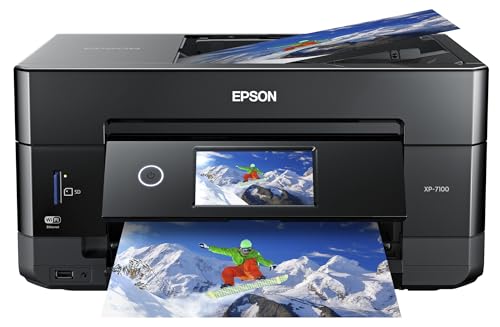
Epson Expression Premium XP-7100
Epson Expression Premium XP-7100
Best for: Home offices that scan multi-page documents and still want strong photo output from the same machine.
The XP-7100 is the paperwork-friendly option that still prints a keeper photo. Its five Claria Premium inks pair a pigment black for documents with a photo black for deeper shadows, and it is the only model here with a document feeder, so scanning a signed form or a stack of school papers takes one pass. It prints borderless up to letter size, handles CDs and DVDs for labeled archive discs, and offers Ethernet alongside Wi-Fi for a shared family desk that sits near the router.
Which One Fits Your Situation
Filling Albums Every Month
Choose the Canon PIXMA G620. When a single weekend produces a shoebox of 4 x 6 prints, the refillable tanks are the whole argument: one ink set covers thousands of photos, refills are bottles rather than cartridges, and the red and gray inks keep party and holiday colors lively. Accept the slow document pace as the trade for prints that cost a few cents each.
Enlargements for the Wall
Choose the Epson Expression Photo XP-8800. Borderless letter-size output, the highest resolution figure here and light cyan and light magenta inks make it the safest hand for skin tones, skies and black-and-white conversions at 8 x 10. Feed fine art and heavyweight glossy sheets through the rear path one at a time and give each print a few minutes to dry before framing.
One Printer for the Whole Family
Choose the Canon PIXMA TS8820. It keeps plain paper and photo paper loaded at once, prints from a camera card without a computer, turns out sharp homework with its pigment black, and makes square borderless prints for the sizes social photos actually use. The touchscreen keeps walk-up copying simple enough that nobody has to ask how it works.
A Desk That Also Handles Paperwork
Choose the Epson Expression Premium XP-7100. The document feeder, automatic two-sided printing and Ethernet connection make it the natural fit for a home office that scans contracts and forms, while the photo black ink and borderless letter output cover family photos without a second machine. It is the heaviest unit here, so give it a permanent spot rather than a shelf you clear weekly.
Common Mistakes
Judging a photo printer by document speed alone, when seconds per photo and output quality decide how the prints you keep actually look.
Feeding a six-color printer the thinnest bargain glossy paper, then blaming the ink when colors pool, bronzing appears or sheets curl.
Ignoring ink yield figures and buying cartridges for a printing habit that a refillable tank would cover for a fraction of the running cost.
Letting an inkjet sit unused for months, which invites clogged nozzles and wasted cleaning cycles; one small print every week or two keeps ink moving.
Expecting borderless output on every paper size in the tray, when most models limit edge-to-edge printing to a defined list of photo sizes.
Frequently Asked Questions
Do I Need Six Ink Colors for Good Photos?
Not for every subject. Four and five-color sets handle snapshots, school projects and bright outdoor scenes well. The extra light or accent inks earn their keep on faces, fog, dawn skies and black-and-white prints, where smooth transitions matter most. If your favorite photos are portraits and landscapes you plan to frame, six colors are worth choosing; for casual prints, spend the difference on better paper.
How Long Do Prints From These Printers Last?
Both makers design their photo inks for long display life, with fade resistance measured in decades when prints are kept in albums or behind glass, away from sun and humidity. Paper choice matters as much as ink: genuine glossy or luster photo paper from that maker gives the most dependable result. For prints that must outlast everyone, store the digital files in two places as your real archive.
Can These Printers Handle Thick Photo Paper and Cardstock?
Yes, within limits, and the rear feed is the route to use. Every model here has a rear tray or specialty path that takes heavier glossy, matte and fine art sheets one at a time with a straighter travel path. Very thick board and textured stock still vary by weight, so run one test sheet first and select the thick-paper or envelope setting when the driver offers it.
Tank or Cartridge for a First Photo Printer?
Match the ink system to your honest monthly count. If you print a handful of photos around birthdays and trips, a cartridge model is simpler and the ink stays fresh between sessions. If you already know a shoebox of prints waits in your phone, a tank model repays its higher commitment quickly and removes the small anxiety of watching ink levels before every batch.
K
Kissmyaster Editorial Team
We compare specs, materials and verified owner reviews before a product earns a spot. Rankings are never paid.
Affiliate disclosure. As an Amazon Associate we earn from qualifying purchases at no extra cost to you. Prices accurate as of the date shown.
How much does a battery pack cost? We explain what sets what you pay — capacity, charging speed and cables — and which power banks to keep in your bag.
Does tablet mode save battery? We explain how tablet mode cuts drain on a 2-in-1 laptop, and which USB-C power banks keep a tablet running through the day.


 Epson Expression Premium XP-7100