Key takeaways
- InGaAs detector, calibrated at 850, 1300, 1310, 1490, 1550 and 1625 nm.
- Range from +10 to -52 dBm at 850 nm and +10 to -60 dBm at the other wavelengths.
- Measurement uncertainty plus or minus 0.25 dB and resolution 0.01 dB.
- Automatic wavelength detection and automatic dual-wavelength switching.
- Stores 1000 records and connects over USB 2.0.
- SC adapter by default, with optional LC and ST adapters.
- Runs on 2 AA batteries for more than 50 hours (typical).
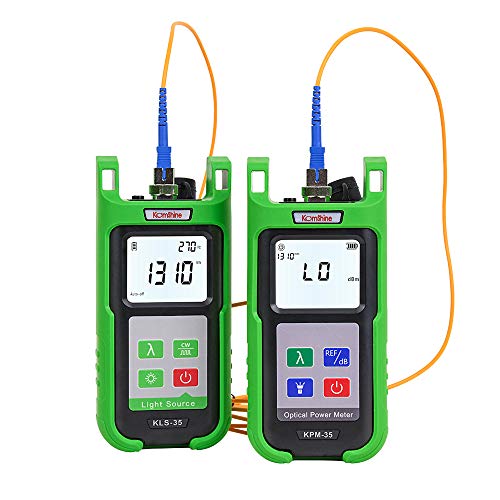
A light source and power meter is the paired fibre-optic test set that measures how much light survives a fibre cable run, and for a general buyer the clearest option is a Fluke Networks SimpliFiber Pro kit: the FTK1000 or FTK1200 for multimode links, the FTK2000 for singlemode links, or the FTK1475 when you need both plus a visual fault locator and inspection tools. This is network cabling equipment, not a household product, so the guide below states plainly who needs it and who should skip it.
Our top picks


As an Amazon Associate we earn from qualifying purchases at no extra cost to you.
What the keyword means
In fibre-optic work, a “light source” is a stable transmitter that sends light of a known wavelength down a cable, and a “power meter” is a receiver that reads how much arrives, in dBm. The difference between what is sent and what is received is the loss of the link, which technicians compare with a loss budget. The two instruments are used as a pair, which is why they are sold together as a kit. Other products also use the words “power meter” and “light” in different senses, such as laser power meters for lab optics, photographic light meters and cycling power meters. This guide covers the fibre-optic pair, the most common meaning for network installers and IT staff.
Who needs it: people who install, repair or certify fibre links in offices, campuses, data rooms and some home-lab setups. Who does not: someone who only plugs a pre-made patch cord between a router and an optical network terminal. For a simple suspected cable fault, a visual fault locator, which shines visible red light, is a cheaper and more basic check than a power meter set.
At a glance: SimpliFiber Pro kits
| Kit | Best for | What the maker lists | Limits |
|---|---|---|---|
| SimpliFiber Pro FTK1000 and FTK1200 | Multimode links in buildings | Power meter plus a multimode source (850 and 1300 nm); the FTK1000 and FTK1200 differ in extras such as the inspection scope, so compare the maker’s contents lists | Cannot test singlemode links without a singlemode source |
| SimpliFiber Pro FTK2000 | Singlemode links such as campus or telecom cabling | Power meter plus a singlemode source (1310 and 1550 nm) | Cannot test multimode links without a multimode source |
| SimpliFiber Pro FTK1475 | Installers who need everything in one case | Power meter, multimode and singlemode sources, a VisiFault visual fault locator, an FI-500 FiberInspector, two FindFiber sources, adapters and a cleaning kit | Premium tier |
An optional 1490 and 1625 nm singlemode source can be added to any kit, according to the maker.
Key stated specs
The power meter
- InGaAs detector, calibrated at 850, 1300, 1310, 1490, 1550 and 1625 nm.
- Range from +10 to -52 dBm at 850 nm and +10 to -60 dBm at the other wavelengths.
- Measurement uncertainty plus or minus 0.25 dB and resolution 0.01 dB.
- Automatic wavelength detection and automatic dual-wavelength switching.
- Stores 1000 records and connects over USB 2.0.
- SC adapter by default, with optional LC and ST adapters.
- Runs on 2 AA batteries for more than 50 hours (typical).
Multimode source (850 and 1300 nm)
- LED emitter with a minimum output of -20 dBm or higher.
- Dual-wavelength output at 850 and 1300 nm.
Singlemode source (1310 and 1550 nm)
- FP laser with a minimum output of about -7 dBm (typical).
- Minimum output of about -3 dBm (typical) at the optional 1490 and 1625 nm wavelengths.
Other stated points
- The maker describes the sources as Class 1 products; still treat every fibre port with care.
- FindFiber remote ID sources are included in the FTK1475 kit.
How to choose
Multimode or singlemode?
Match the kit to the fibre in the building. Multimode is common inside buildings and short runs, and singlemode is common for longer links. The fibre jacket, printed markings and cable documentation indicate which type is installed. Using the wrong source can give a misleading result, so confirm before you test.
Connector types
The SimpliFiber Pro meter ships with an SC adapter and offers optional LC and ST adapters, and the sources have their own connector type. If your patch panels use LC, plan for adapters or test cords with the right ends. Clean connectors matter, which is why the FTK1475 includes an inspection tool and a cleaning kit.
Wavelengths
If your network uses extra wavelengths such as 1490 or 1625 nm, check that the meter is calibrated at them, which the maker lists, and consider the optional source.
Record keeping
The meter stores 1000 records and offers USB transfer, which helps if you must hand over test results to a customer or keep them for an audit.
Budget, mid-range and premium tiers
- Budget: a visual fault locator alone, for finding breaks or tight bends. It does not measure loss.
- Mid-range: a single-type kit such as the FTK1000, FTK1200 or FTK2000.
- Premium: the FTK1475 complete kit, or higher-end certification testers that go beyond the scope of this guide.
Pick-by-need decision table
| If you … | Choose |
|---|---|
| Work with multimode links inside buildings | SimpliFiber Pro FTK1000 or FTK1200 |
| Work with singlemode links over longer distances | SimpliFiber Pro FTK2000 |
| Need both fibre types, a visual locator and an inspection scope | SimpliFiber Pro FTK1475 |
| Only need to find a break or a sharp bend | A visual fault locator |
| Test copper and fibre together | A combined copper and fibre kit such as the Fluke Networks MS2-FTK |
The MS2-FTK pairs a MicroScanner2 copper cable verifier with a multimode SimpliFiber Pro set, according to the maker’s listing. It suits network installers who handle copper and short multimode runs; read the maker’s page for the full contents before choosing.
Safety and handling
- Never look into the end of a fibre or a connector when a source is on. Even Class 1 devices, as listed, should be treated with care, and other equipment on the link may emit stronger light.
- Do not use a power meter on a live fibre carrying traffic unless the maker’s instructions say it is safe; treat any unknown link as live until confirmed otherwise.
- Clean and inspect connectors before every test; a dirty connector gives false loss and can damage the end face.
- Cap unused ports and keep dust caps in place.
- Do not bend fibre tighter than the cable maker’s minimum radius.
- Cabling inside walls, in ducts or near mains power must follow local code. Leave installation to qualified low-voltage or fibre installers where required.
How a loss test works
- Reference the setup: connect the source to the meter with a known-good test cord and record the reference level, as the manual describes.
- Connect the source at one end of the link and the meter at the other, using clean launch and receive cords.
- Read the power at each wavelength; the difference from the reference is the link loss.
- Compare the result with the link’s loss budget as specified by the application or the cabling standard in use.
- Save the record and clean connectors before any retest.
Alternatives
- Visual fault locator. Finds breaks and tight bends over short distances, but it does not measure loss in dB.
- OTDR. A more advanced instrument that maps events along a fibre. It is much costlier and belongs to professional use.
- Laser power meter for optics. If you came looking for a bench laser power meter for a lab, that is a different product family; use the maker’s specifications for wavelength and power range.
Terms you will meet in fibre testing
- dBm. A logarithmic unit of optical power relative to one milliwatt. The SimpliFiber Pro power meter range is listed in dBm.
- dB loss. The difference between the reference level and the received level, used to judge a link against its loss budget.
- Launch condition. How the light enters the fibre. Launch condition is specified in the maker’s data sheet for each source.
- Reference. The baseline measurement taken with test cords only, before the link is added.
- Loss budget. The maximum loss allowed for the link under the application or cabling standard in use.
Knowing these terms helps you read a kit’s manual and compare it with other makers’ listings. If the vocabulary is new and the job is a one-off, hiring a cabling contractor may be more practical than buying a kit.
Frequently Asked Questions
Do I need a light source and power meter for home internet?
Almost never. A fibre connection to the home is usually tested by the provider’s technician. If the service is down, check connectors and call the provider rather than testing a live line yourself.
What is the difference between a power meter and a visual fault locator?
A power meter measures how much light arrives in dBm, which lets you calculate loss. A visual fault locator injects visible light to show breaks or tight bends but gives no loss figure.
Can one kit test both multimode and singlemode?
The FTK1000 and FTK1200 are multimode kits and the FTK2000 is a singlemode kit. The FTK1475 includes both types of source. The meter itself is shared.
How accurate is the meter?
The maker lists measurement uncertainty of plus or minus 0.25 dB and resolution of 0.01 dB for the SimpliFiber Pro power meter. Connector cleanliness and test cord quality affect real results.
What battery life can I expect?
The maker lists more than 50 hours typical for the meter on two AA batteries. Source battery life is listed separately in the maker’s data sheet.
Is it safe to look at the fibre end?
No. Do not look into a fibre end or connector while any source could be active, and treat unknown links as live until confirmed otherwise.