Key takeaways
- The BQQJDD 15.6-inch digital calendar pairs a touchscreen chore chart with 32GB storage, calendar sync and color-coded profiles for busy family walls.
Paper planners pinned to the fridge door have a habit of going stale within a week. Someone adds a dentist appointment in pen, someone else forgets to mention football practice moved, and the whole system quietly falls apart. A wall-mounted digital calendar solves that problem by living in the same place but updating itself, pulling events from the calendars your family already uses and showing them on one shared screen that everyone can read at a glance.
The BQQJDD 15.6 Inch Digital Calendar Wall Touch Screen Chore Chart, 32GB Electronic Calendar is built around exactly that idea. It combines a family planner, an interactive chore chart and a meal planner on a single touchscreen, with color-coded profiles for each member of the household. This guide walks through how it works, what to check before ordering, and which households will get the most from it.
Quick Picks
As an Amazon Associate we earn from qualifying purchases.
| Product | Best for | Key spec |
|---|---|---|
| BQQJDD 15.6 Inch Digital Calendar Wall Touch Screen Chore Chart, 32GB Electronic Calendar | Families who want one shared wall planner with chores and meals built in | 15.6-inch touchscreen with 32GB storage and multi-calendar sync |
How to Choose
Screen Size and Placement
A family calendar only works if people can read it without walking right up to it. A 15.6-inch screen sits in a useful middle ground: large enough for a month or week view to stay legible from across a kitchen, yet compact enough to hang on a wall section or stand on a counter without dominating the room. Before ordering, measure the spot you have in mind and think about eye level for the youngest reader in the house. The BQQJDD unit ships with both a wall mount and a desktop stand, so you can try a hallway wall first and move it to a desk later if the traffic pattern in your home changes.
Calendar Sync Compatibility
The real value of a digital calendar is that nobody has to maintain it twice. Check which services it can pull from before you buy. This model syncs with Google, iCloud, Outlook, Cozi and Yahoo calendars, which covers the accounts most households already keep. If your family is split across two or three of those services, a device that merges them into one view removes the classic problem of a school event sitting on one parent’s phone and a work trip sitting on the other’s, with neither person seeing the clash until the morning it happens.
Chore and Routine Features
For households with children, the calendar grid is only half the story. Look for an interactive chore chart that lets you assign tasks to individual profiles and lets kids check them off on the screen itself. Color-coded per-member profiles make it obvious whose turn it is to feed the dog or take out the recycling, and a built-in meal planner answers the nightly dinner question in the same glance. These features turn the screen from a passive display into a small household command center, and they are the main reason to choose a dedicated device over a spare tablet running a calendar app.
Connectivity and Storage
A wall calendar is only as current as its connection. Dual-band 2.4/5GHz Wi-Fi support matters because busy homes often run crowded networks, and the faster band keeps sync quick when the router sits a room or two away. Storage is the other quiet specification: 32GB of built-in memory gives the photo frame mode room to hold a large family photo library locally, so the screen can double as a digital picture frame between schedule checks. If you plan to load years of photos, generous onboard storage saves you from constantly pruning the slideshow.
Features That Matter Day to Day
Color-Coded Profiles for Every Member
Each person in the household gets a profile with its own color, so a single glance at the week view separates one child’s piano lesson from another’s scout meeting. When an event is added from a synced account, it lands under the right person automatically if the source calendar is assigned to their profile. Over time this visual shorthand becomes the fastest way to answer the question of who needs to be where, and it reduces the mental load on whoever usually plays family scheduler.
An Interactive Chore Chart Kids Can Use
Chores fail most often because the list lives somewhere nobody looks. Putting the chart on the same screen as the calendar fixes that: children pass it every morning, and tapping a task complete on the touchscreen gives them a small moment of ownership. Parents can review what is done and what is pending without a separate conversation, and the routine repeats week after week without reprinting anything. For families trying to build consistent habits, that visibility is worth more than any single specification on the box.
Meal Planning on the Same Screen
Deciding dinner at 5 p.m. with hungry people nearby is a daily friction point. The built-in meal planner lets you sketch the week’s dinners ahead of time, right beside the schedule that affects them, so a late practice night gets a quick meal and a free evening gets the bigger cook. Because the plan sits on the wall where everyone can see it, requests and substitutions surface early instead of at the supermarket. It also makes grocery lists easier to build, since the week’s plan is written down in one place rather than scattered across memory.
Photo Frame Mode Between Schedules
A screen that only shows a grid can feel stark in a living space. When the calendar is idle, this unit switches to a digital photo frame mode fed through its companion app, rotating through family pictures stored in its 32GB of memory. That dual role helps the device earn its wall space: it is a planner when you need information and a picture frame the rest of the time. Grandparents visiting for the holidays tend to linger over the slideshow, which is a pleasant side effect no paper planner ever produced.
The Product in Detail
BQQJDD 15.6 Inch Digital Calendar Wall Touch Screen Chore Chart, 32GB Electronic Calendar
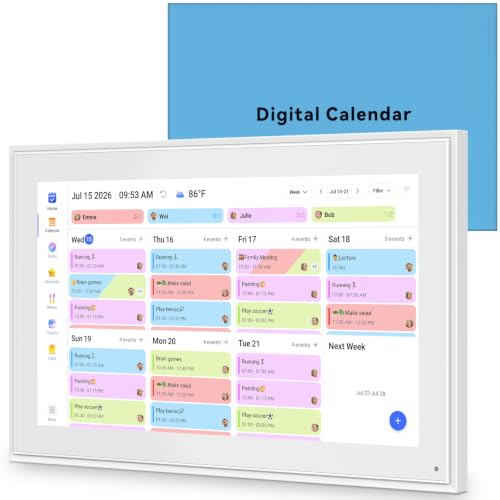
This 15.6-inch touchscreen calendar is designed to be the single schedule a whole household shares. It syncs with Google, iCloud, Outlook, Cozi and Yahoo accounts over dual-band Wi-Fi, then presents everything in color-coded profiles so each person’s commitments stay visually separate. Beyond appointments, it carries an interactive chore chart and a meal planner, and when the schedule is quiet it becomes a digital photo frame using photos loaded through the app. The package includes both wall-mounting hardware and a desktop stand, so placement can change as your routine does. At 6.82 lb it is substantial enough to feel secure on the wall.
Specs
- 15.6-inch touchscreen display
- 32GB built-in storage
- Syncs with Google, iCloud, Outlook, Cozi and Yahoo calendars
- 2.4/5GHz dual-band Wi-Fi
- Color-coded per-member profiles
- Interactive chore chart and meal planner
- Digital photo frame mode via app
- Wall mount and desktop stand included
- Item weight: 6.82 lb
- Manufacturer part: CA-XHC-Variants-001
Best for: Families juggling several personal calendars who want one shared wall display with chores and meal planning built in.
Watch out for: The screen needs a power outlet within reach of your chosen spot, and every family member’s calendar must be shared or connected for the merged view to stay complete.
Which One Fits Your Situation
Busy Parents Coordinating Kids’ Schedules
If your week involves school runs, clubs, matches and two working adults, the merged calendar view is the headline feature. Connect each existing account once, assign colors to the children, and the wall screen becomes the answer to every logistics question. The chore chart layered on top means routines like homework, pet care and tidying get tracked in the same place as the events surrounding them.
A Kitchen Command Center
Kitchens are where families naturally gather, and a wall-mounted screen there catches people at breakfast and dinner. Use the desktop stand on a counter if wall space near an outlet is limited, keep the meal planner front and center, and let the photo frame mode soften the look between checks. This placement tends to get the most daily glances per hour of any room in the house.
Grandparents Keeping Up With Family
For a grandparent’s home, the appeal is passive visibility: birthdays, visits and school concerts appear automatically from shared family calendars without anyone remembering to phone with updates. The photo frame mode adds a rotating set of family pictures between events. Setup help from a relative is wise at the start, since accounts and Wi-Fi passwords need entering once before the screen can run itself.
A Shared Flat or Family Office
Households of adults can use the same tools differently: profiles separate housemates’ shifts and deadlines, the chore chart rotates cleaning duties fairly, and the meal planner coordinates shared cooking nights. On a desk stand in a home office it also works as a personal planner with a much larger canvas than a phone, keeping the day’s commitments visible during calls without unlocking anything.
Common Mistakes
- Mounting the screen before checking outlet distance, then discovering the power cable cannot reach and the calendar sits unplugged.
- Connecting only one parent’s calendar, which leaves half the family’s events invisible and recreates the double-booking problem the device was bought to solve.
- Skipping profile colors, so the week view becomes a wall of identical entries that nobody can read at a glance.
- Treating the chore chart as set-and-forget; rotating tasks and reviewing completions weekly keeps children engaged with it.
- Loading photos but never enabling the frame mode, missing the feature that makes the screen pleasant to live with between schedule checks.
Frequently Asked Questions
Which calendars can the BQQJDD digital calendar sync with?
It syncs with Google, iCloud, Outlook, Cozi and Yahoo calendars, so most accounts families already use can feed into one shared view. Each connected calendar can be assigned to a color-coded member profile, which keeps one person’s appointments visually separate from another’s on the week and month displays.
Can it be used on a desk instead of a wall?
Yes. The package includes both a wall mount and a desktop stand, so you can start with whichever placement suits your space and switch later. On a desk it works well as an always-on planner; on a wall it suits kitchens and hallways where several people pass it throughout the day.
How does the chore chart work for children?
Each child can have a profile with assigned tasks shown on the touchscreen. They check chores off directly on the screen as they finish them, and parents can see what is complete and what is still pending. Because the chart sits beside the family calendar, it becomes part of the normal morning and evening routine.
Does it need Wi-Fi to work?
Wi-Fi is needed for the calendar to sync with Google, iCloud, Outlook, Cozi and Yahoo accounts and stay current, and the unit supports both 2.4GHz and 5GHz networks. Photos for the frame mode are stored in the 32GB of built-in memory, but keeping the device connected is what makes the schedule trustworthy day to day.